
How it works
From complex to simple
Designed to make the most complex logistical operations achievable with a few clicks.
The event flow
One ticket, start to finish
This is how last mile delivery software works in Zippykind: an order comes in, a driver is dispatched, the route is built, and the customer gets updates until it arrives.
POS or website order
Your store takes the order; details post to Zippykind over the API.
Integration
Orders arrive from the systems you already run through Zapier and the API, and pharmacy systems such as Epic (Willow) and Liberty connect directly.
Phone order
Dispatch keys it into the Add New Ticket form.
Ticket created in Zippykind
Auto-dispatched to a driver by delivery zone or proximity, or dragged where you want it.
Driver runs the ticket
The Drivers App sequences the route and walks each stop.
Customer stays in the loop
SMS / email fires automatically at every status change.
Auto-dispatched to a driver
The ticket lands on a driver without anyone dispatching it by hand. Auto-dispatch can pick by territory, by a driver’s proximity to the pickup or the delivery destination, or it can be blasted to a whole team where the first driver to respond claims it.
The driver takes the ticket
Delivery tickets can be auto-accepted, or left for a driver to claim in the app — whichever suits how your fleet runs.
En route, and watchable
The driver is on the way, and your customer can follow it in real time on your brandable, Uber-like tracking page — with a predictive ETA rather than a two-hour window.
Driver is at the door
Arrival at the delivery destination fires a custom heads-up message to the customer, so nobody misses the knock.
Closed out with proof
The ticket is complete. The driver attaches photos and a signature, taken in person or contactless, and the customer can leave a review and feedback.
Nobody home — and you know straight away
A failed ticket is flagged in the dispatch software so an operator can reschedule it, instead of it quietly disappearing.
Or send it back. Mark the ticket Return To Sender and its package follows your RTS chain of custody: the stops you set for returns, each one scanned by the driver, until it is back with the sender. Every scan is logged, so you can see where a returning package is at any point.
Every status change can send your customer a
custom, brandable SMS or email. And every status change and driver action
is logged with GPS coordinates, collected into one
delivery manifest PDF your dispatch operators can pull up in a click.
See every status in the full ticket lifecycle diagram
Proof + live tracking
Customer watches the live ETA on your branded page; the delivery closes with photo, signature, and GPS.
See it
Watch a delivery run end to end
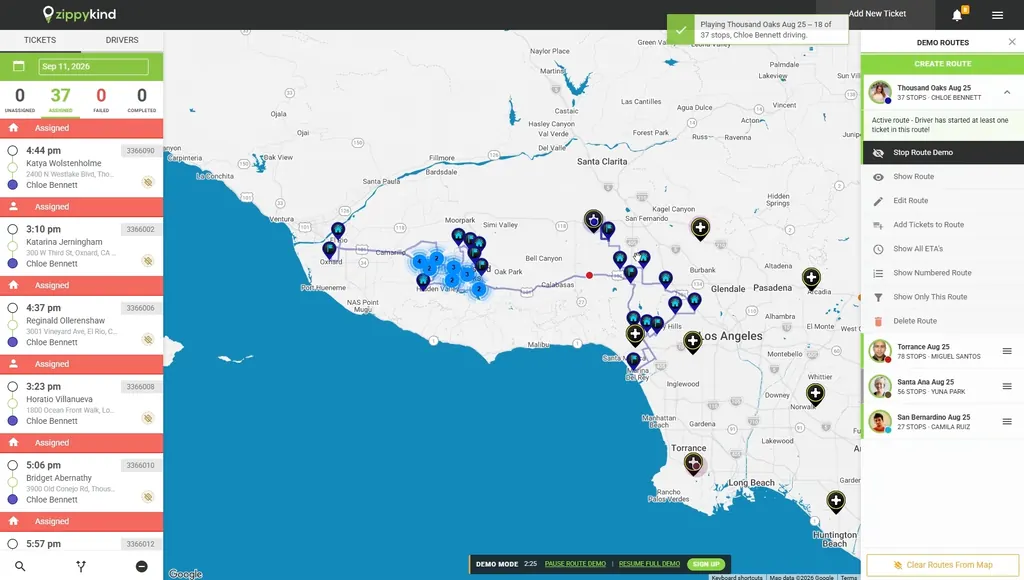
Watch the dashboard demo
Click any line to jump to that moment.
Getting started
Four steps to your first delivery
1. Create your account
Start your free trial in minutes. No sales call.
2. Set your zones
Draw the areas you deliver to and set your rules.
3. Add your drivers
Invite drivers to the free iOS and Android app.
4. Dispatch
Create a ticket, assign it, and watch it move on the live map.
The flow
How a delivery actually moves
Your store receives an order
By phone, from your store, or pushed straight in over the API.
Dispatch assigns it to a driver
Auto-dispatched by zone or proximity, or dragged where you want it.
The driver runs it
Their route sequences itself, and the customer gets a live ETA link.
The driver delivers it
Photo, signature, and GPS close the ticket out.
On the final mile, the driver app captures proof of delivery, a photo, a signature and the GPS location, saved to the ticket the moment the driver finishes.
The daily loop
What a day on Zippykind looks like
- Orders arrive. Create tickets manually, upload a batch, or push them in over the API from your POS or store.
- Dispatch assigns. Proximity or zone rules pick the driver, or you drag it where you want it.
- Drivers run the route. The app sequences their stops and navigates turn-by-turn.
- Customers watch it come. A branded tracking link with a live pin and ETA cuts the “where is it?” calls.
- Proof closes the loop. Photo, signature, and GPS land on the ticket the moment it's delivered.
- Reports write themselves. Auto-reports on volume, on-time rate, and driver performance.
Integrations
Works alongside what you already run
Zippykind is delivery software, not a point-of-sale or pharmacy management system. It runs alongside whatever you already use. An order can start anywhere, taken over the phone into the Add New Ticket form, received through your POS or website, or pushed straight in over the API, and it lands on the same dispatch dashboard.
Connect the tools you already run through our open API and webhooks, or through Zapier, including Shopify, QuickBooks, BigCommerce, and Salesforce, plus hundreds more. Once connected, new orders can create delivery tickets automatically.
“It takes a lot of hard work to make something look simple.”Steve Jobs
Thousands of iterations and coffee-fueled nights later, we’re ecstatic to release Zippykind v3.0, the most complete delivery management platform we have ever built.
Run your first delivery today
Start your free trial, set up your zones and drivers in an afternoon.


